How to enable echo delay in computer windows7 or windows Xp in Easy ways


Here is the simple way to enable echo in computer microphone without extra sound card.

Sometimes we need to echo the sound in microphone or to disable echo when we make calls or recordings. this solution will work in both case

you will need this if you want to echo your sound for singing purpose and and you will need to reduce the echo if you are calling someone with that microphone

What i am telling you is about an audio repeated program.
it will  execute our microphone sound and buffer it and produce later in seconds.
I am going to tell you the exact way i did this to make echo in my microphone.

I was searching for days to find a nice solution but couldn't get any.
and one day i found an audio repeater program.


http://software.muzychenko.net/eng/vac.html
Here is direct link:
http://software.muzychenko.net/vac410.zip

Simply unzip file, DO NOT INSTALL the application. You are only interested in 1 file. There are 2 folders x64 and x86.
They have identical content (audiorepeater.exe and audiorepeater_ks.exe)
I have Windows 7 64 bit, so I selected x64 of audiorepeater.exe. 

Then i set settings as follows to make an echo effect

After clicking Start and Speaking in to microphone, i could hear my voice is echoing.
You can simply change the values and test yourself.


And if you want to reduce the existing echo sound even after, feel free to ask doubts in comments :)


Read Article →

SpeedUp Using ReadyBoost in windows7


If you really want to speedup your windows 7 installed PC, you can use Readyboost feature of windows7.
readyboost is a service that help operating system ,to use a flash usb as a ram(Random Access Memmory).

Here is the simple steps to follow if you decided to setting up readyboost now.

Plug IN your Flash  USB.


Open My computer,


Select properties of the usb flash drive,


As in the above picture, select Tab 'ReadyBoost'

Select Use this Device Option.

Assign Space you reserve for System Speed.

and press Ok.

You are done!

If it says, current hardware doesnot support,

Try
Backuping any files that exist in usb drive, and do a full format. when formatting, set options as ,Filesystem:NTFS, Allocation unit Size:Default allocation size. and untick Quick format.


Click on start, after Appearing 'Formating complete' dialogue box, try repeating the first step !

To Unboost, right click the usb flash drive in my computer, and select Eject.

Read Article →

Prevent Softwares From Autorun


Have you felt like your windows operating system takes too much time to load on startup?
One way to overcome this, is to Disallow unwanted softwares from running autmatically when windows starts.
We can configure  windows startup and disable softwares from autorun.
Its a simple tweek that gives your computer a boost when starting up.
Normally, when we install softwares in our pc, if it is designed to run on automatically, it will increase the time
in bootup.

Many of users dont want this unless they use that software everytime.
To config windows startup and prevent softwares frm running automaticly when windows starts,
press windows key + r ,(or start -> run )
in run dialogue box, type msconfig .

Press OK.
in the "startup" tab, untick softwares which you dont want to run on startup.


 Please dont untick system programs from running.(igfxtray,hkmcd,avira etc),
(you may untick gtalk,yahoo messenger,etc)
Then click apply.
Click ok.
You will be asked to restart you pc, If you have any other work in progress, Click NO.
Else Click Ok to restart.

These steps will speed up your system on startup.


Read Article →

Clear Clipboard Contents in Windows 7

Sometimes we will need to clear contents from clipboard.
For example, when we Copy entire contents of a microsoft Word file, It will slow down our system (It Happend to me ,many times).

So Here is a way to Clear all clipboard items.

In Windows 7

Click on start menu, select run.

OR

Press " Windows key + R "  then The Run Prompt will appear.

Type   cmd /c "echo off | clip"  in that field.

Screenshots included for those who find difficulties doing this.


If you wish to clear clipboard occassionaly and you dont want to waste time typing this every time, there is an option.
Make a shortcut for that Command . so with a click, it will work for you.

To do this, right click on desktop and New - ShortCut.

A prompt will appear.

Type the command there and click Next.


Give it a name. (anything you like. example:clipboardcleaner).

A new Icon will appear in desktop in that name. 

Doubleclick it to clear Clipboard. 

Give it a test after you done it. 
Open Notepad, write somehing
Copy Entire writing, click ctrl+A , then ctrl+C.

Press ctrl+V to see whether it copied or not.

Now doubleclick Shortcut you just created.

Again try pressing ctrl+V

If nothing pasted, everything worked fine, else something wen wrong. Try Following steps again. 


Read Article →

Play Mobile Games in computer


How to Play Mobile Games In computer?
How to Use Java Emulator for  Computers?

Many of us still struggling with these question even now!
Am writing the Methods i found .
Please note that here we are only describing about java games. or java softwares, with an extention of '.jar'.
Example : gameloftb 3d pokerman.jar , prince of persia.jar.

SOLUTION IS............
USING SJBOY

First of All..
Download SJBOY.exe
Downlod a test game named   game.jar

after downloading two of above files, put it on desktop.


dont open sjboy with double click.
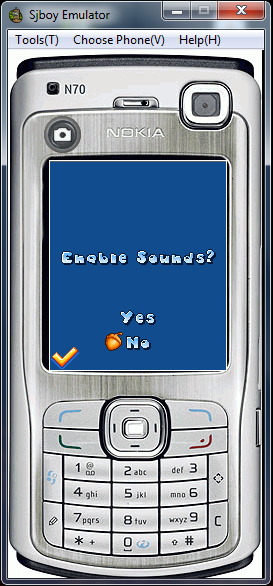
if you open sjboy.exe ,you will get an error similiar to this

Instead
Drag the game.jar file to the sjboy exe on the desktop.

then it will open the game!
Follow the instructions,
YOU CAN USE NUMBERKEYPAD or MOUSE !


Yep. you are done!!
Now you can run any java softyware with this emulator!
IF it doesnt work for you.. dont be upset. there is always another choice! :)


Additional Notes.
To change phone model in sjboy
select 'choose phone'  in menu or press 'V' in key board.
Select any of  available phone model. here i am demonstrating sony ericson's interface.


Also.. you can take snapshotes of current window in Sjboy. to do this ,Click tools in menu or press t in keyboard and  select snapshot option, now save it. you are done. :)


Read Article →